Grid Pro Sculptor
CuadrículaA partir de: 
24.99
MT4: Disponible
MT5: No disponible
Hedge: Requerido
Código fuente: Disponible
Prueba/demostración gratuita: Disponible
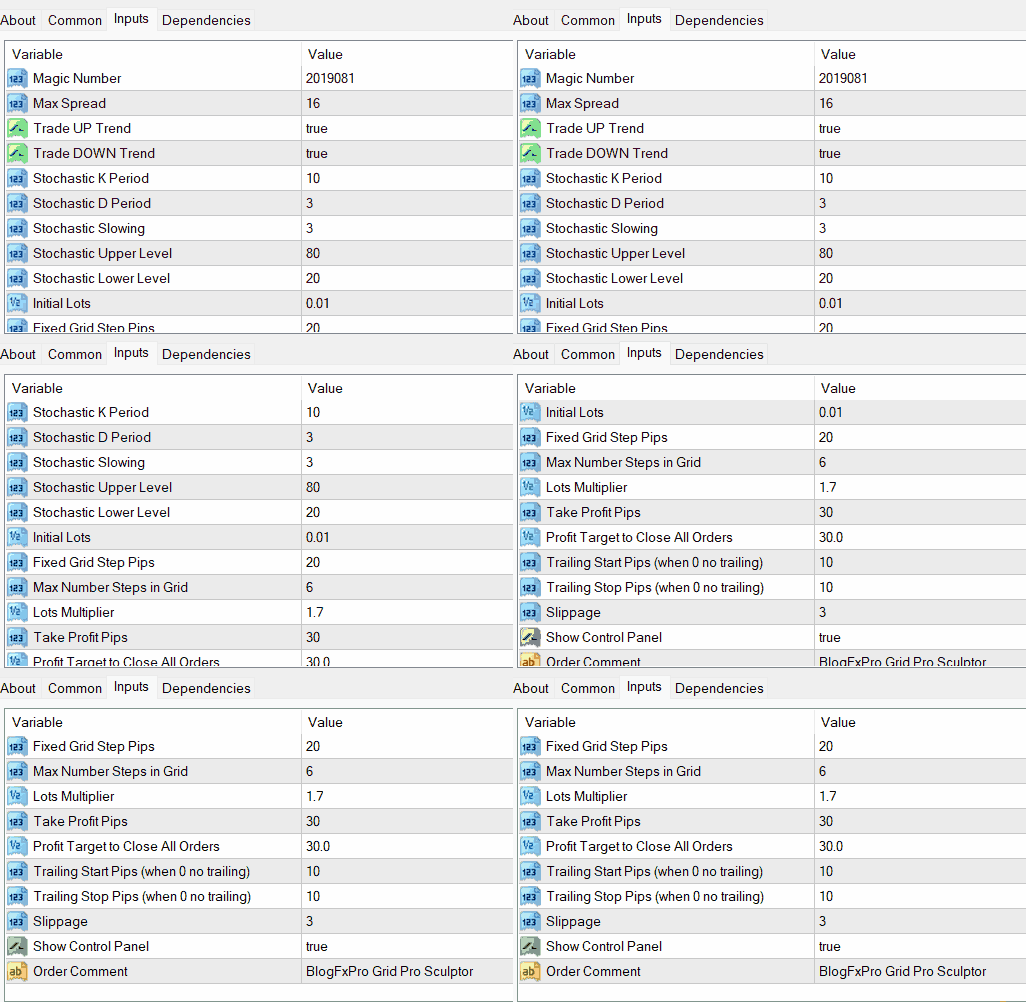
| Magic Number | The Magic Number is a unique identifier assigned to orders placed by the EA. It helps distinguish orders generated by "Grid Pro Sculptor" from those of other EAs or manual trades. This is crucial for tracking and managing your positions effectively. |
| Max Spread | This parameter sets the maximum allowable spread at which the EA will enter trades. If the actual spread exceeds this value, the EA will refrain from opening new positions. Controlling the spread is essential to ensure that your orders are executed under favorable conditions. |
| Trade UP Trend | When enabled (true), this option allows the EA to trade in the direction of an upward trend. If you prefer to avoid trading in bullish trends, you can disable this option by setting it to false. |
| Trade DOWN Trend | Similar to the previous parameter, this one controls whether the EA should engage in trading during downtrends. Enabling (true) this option allows the EA to open positions when markets are bearish, while setting it to false restricts trading during such conditions. |
| Stochastic K Period | The Stochastic K Period is the number of periods used in calculating the fast-moving line of the Stochastic oscillator. A shorter period may result in more responsive signals, while a longer one may smooth out fluctuations. |
| Stochastic D Period | The Stochastic D Period determines the number of periods used to calculate the slow-moving line of the Stochastic oscillator. It helps filter out noise and provides a more reliable trend-following signal. |
| Stochastic Slowing | This parameter adjusts the slowing factor for the Stochastic oscillator. A higher value smoothens the Stochastic lines, making them less sensitive to short-term price fluctuations. |
| Stochastic Upper Level | The Stochastic Upper Level sets the threshold above which the Stochastic oscillator is considered overbought. When the Stochastic value crosses this level from below, it can trigger sell (SELL) signals. |
| Stochastic Lower Level | Conversely, the Stochastic Lower Level establishes the threshold below which the Stochastic oscillator is deemed oversold. When the Stochastic value crosses this level from above, it can trigger buy (BUY) signals. |
| Initial Lots | This input determines the size of the initial trading position, expressed in lots. It's the starting point for position sizing when the EA begins trading. |
| GridStepPips | The GridStepPips input defines the fixed distance, in pips, between each grid level. Grid levels are the price levels at which the EA places pending orders. For example, if set to 20 pips, the EA will place pending orders at intervals of 20 pips apart. |
| GridMaxStepsCount | This input limits the maximum number of grid levels that can be established by the EA. Once the maximum number of grid levels is reached, the EA will not create any more pending orders. It helps control the depth of the grid and manage risk. |
| LotsMultiplier | The LotsMultiplier parameter determines the factor by which the lot size of each subsequent grid level will increase. For instance, if set to 1.7, each new grid level will have a lot size 1.7 times larger than the previous one. This allows for the potential to accumulate larger positions as the grid expands. |
| TakeProfitPips | TakeProfitPips sets the profit target, in pips, at which the EA will close individual grid-level positions. When the price reaches this level, the EA will lock in profits by closing the position at the specified profit. |
| ProfitTargetToCloseAll | This parameter sets a cumulative profit target, in pips, for all open grid-level positions. When the total profit across all positions reaches this threshold, the EA will automatically close all open positions, helping traders secure profits. |
| TrailingStartPips | When TrailingStartPips is greater than zero, it activates a trailing stop mechanism. The EA will start trailing positions when they are in profit by the specified number of pips. It allows traders to capture additional profits as the market moves in their favor. |
| TrailingStopPips | This parameter determines the distance in pips between the current price and the trailing stop level. When activated, the trailing stop will follow the price by this specified distance, helping protect and maximize profits for open positions. |
| Slippage | Slippage refers to the acceptable deviation in pips between the requested price of a trade and the actual executed price. It accounts for price fluctuations during order execution. A lower slippage setting may lead to more precise trade entries but could result in more rejected orders in volatile markets. |
| OrderComments | OrderComments allows traders to add a custom comment to the orders placed by the EA. This can be helpful for tracking and identifying orders associated with "Grid Pro Sculptor" among other trades in your trading account. |

Lina Braun
• 21/7/2025
Es wäre nützlich, einen historischen Leistungsverfolger zu haben, der vergangene Handelsergebnisse aufzeichnet und anzeigt, um sie zu analysieren.
Hugo Lefevre
• 26/6/2025
Offrir une intégration avec les calendriers économiques pour suivre les événements économiques à venir pourrait aider les traders à éviter les périodes de volatilité.
Mia Bergeron
• 21/4/2025
Consider incorporating an AI-based system that continuously adapts grid parameters based on changing market conditions.
Ethan Botha
• 26/3/2025
Can you add support for more technical indicators, like Moving Averages or Relative Strength Index (RSI), to enhance entry and exit signals?
Sergey Kozlov
• 30/12/2024
Было бы полезно иметь функцию, которая позволит пользователям симулировать различные рыночные сценарии для оценки потенциальных результатов выбранных настроек сетки.
Amir bin Aziz
• 26/12/2024
Adakah terdapat rancangan untuk menawarkan lebih banyak sumber pendidikan, seperti tutorial video atau webinar, untuk membantu pengguna memahami konsep perdagangan grid dengan lebih baik?
Fatima Khan
• 29/8/2024
هل يمكنك تقديم أداة إدارة المخاطر التي تحسب أحجام المراكز بناءً على نسبة محددة من رصيد الحساب، مما يضمن التداول المسؤول؟
Naina Bhatia
• 9/6/2024
Is there a plan to offer multi-language support to cater to a more diverse user base?
James Smith
• 30/3/2024
Consider adding a function that provides real-time market sentiment analysis to help traders gauge market conditions.
Fatima Khan
• 17/1/2024
تنفيذ ميزة اختبار العودة داخل الEA سوف يمكن المتداولين من تقييم الأداء التاريخي لإعداداتهم المختارة.
Maria Ivanova
• 13/1/2024
Планируется ли предоставить подробное руководство пользователя с детальными объяснениями каждого параметра и стратегии?
Vihaan Sharma
• 21/12/2023
Integrating a social trading feature that allows users to share and follow successful grid trading strategies could enhance community engagement.
Benjamin Dubois
• 8/10/2023
Adding an option for partial profit-taking at predefined levels within the grid could allow for more dynamic profit management.
Mia Thompson
• 1/10/2023
Can you add compatibility with more trading platforms to widen the accessibility of "Grid Pro Sculptor"?
Ava Wilson
• 1/3/2023
Is there a plan to optimize resource usage? Some users have reported high CPU and memory usage during EA operation.
Charlotte Gagnon
• 8/2/2023
Could you consider incorporating a news feed feature that allows traders to stay updated on market events that could impact their grid trading strategy?
Noah Keller
• 2/12/2022
Die Einführung von weiteren vordefinierten Rasterstrategien für verschiedene Marktbedingungen wäre von Vorteil. Zum Beispiel ein volatilitätsangepasstes Raster oder ein Trendfolger-Raster.
Lucas Pereira
• 21/10/2021
Existe um plano para colaborar com especialistas em negociação ou realizar pesquisas de usuários para coletar feedback para futuras melhorias?

 español (Venezuela)