
Trend GridFX
TrendfolgeBeginnend ab: 
29.99
MT4: Verfügbar
MT5: Nicht verfügbar
Hedge: Nicht erforderlich
Quellcode: Nicht verfügbar
Kostenlose Tests/Demos: Verfügbar
| Magic Number | This input allows you to assign a unique identifier to the EA's trades. It's a crucial feature when running multiple instances of the EA on the same trading account to prevent interference between them. |
| Max Spread | This parameter defines the maximum acceptable spread in pips at which the EA is allowed to execute trades. If the current market spread exceeds this value, the EA will refrain from opening new positions, helping to avoid unfavorable trading conditions. |
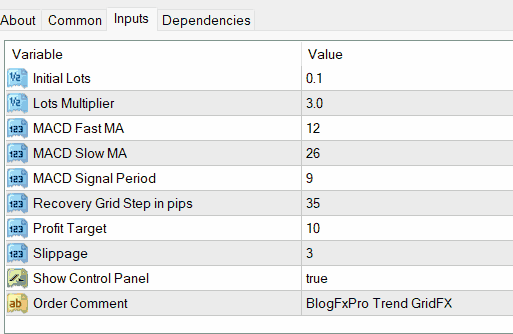
| Initial Lots | This input determines the size of the initial trading position in lots. It serves as the foundation for the EA's trading strategy, setting the scale of the first trade when a trend is detected. |
| Lots Multiplier | The Lots Multiplier is a factor by which the EA increases the lot size for subsequent orders in the grid. This allows for dynamic adjustment of trade sizes as the grid expands, providing flexibility in risk management. |
| MACD Fast MA | This input specifies the period for the fast Moving Average component of the MACD (Moving Average Convergence Divergence) indicator, helping the EA identify short-term trends. |
| MACD Slow MA | It defines the period for the slow Moving Average in the MACD indicator, enabling the EA to recognize longer-term trends. |
| MACD Signal Period | This parameter sets the period for the signal line in the MACD indicator, aiding in trend confirmation and entry/exit signals. |
| Recovery Grid Step | This input specifies the distance in pips between each level of the recovery grid. If the price moves against the initial trade, the EA will deploy this grid at the defined intervals to attempt to recover losses. |
| Recovery Grid Profit Target | This parameter sets the profit target for each level of the recovery grid. When the price reaches this target, the EA will close the corresponding grid level, aiming to lock in profits. |
| Slippage | Slippage refers to the allowable deviation between the requested price and the actual executed price for a trade. This input helps manage execution-related issues during volatile market conditions. |
| Order Comments | Order comments allow you to add a custom label or description to the trades executed by the EA. This feature can be useful for tracking and identifying specific trades in your trading history, especially if you're running multiple EAs or strategies simultaneously. |

Camille Petit
• 19.10.2025
Mettre en place une fonctionnalité de stop suiveur pour sécuriser les profits au fur et à mesure que les tendances se développent, offrant ainsi une gestion des risques supplémentaire.
Khalid Al-Mutairi
• 15.09.2025
طبق استراتيجية إدارة الأموال استنادًا إلى نسبة من رصيد حساب التداول لتعزيز مراقبة المخاطر.
Aisha Al-Mansouri
• 25.04.2025
فكر في إضافة ميزة تسمح للمستخدمين بحفظ وتحميل تكوينات مسبقة مختلفة لضبط الاستراتيجيات بسرعة.
Mia Thompson
• 23.02.2025
Enhance the EA's compatibility with different trading platforms to cater to a wider audience of traders.
Ahmed Al-Mansoori
• 19.07.2024
قم بدمج فلتر أخبار يمكنه تعطيل التداول مؤقتًا خلال الإعلانات الاقتصادية الرئيسية لتجنب التقلبات الكبيرة.
Emma Tremblay
• 09.07.2024
Add a risk-reward ratio calculator to assist users in setting appropriate take-profit and stop-loss levels.
Madison Wilson
• 22.01.2024
Consider adding more trend identification indicators to enhance the EA's ability to capture various market conditions.
Charlotte Clark
• 19.11.2023
Implement a "stealth mode" feature that hides pending orders from brokers to prevent stop hunting.
Ava Wilson
• 15.11.2023
Incorporate a backtesting feature to allow users to assess the EA's performance against historical data.
Sultan Salem
• 28.09.2023
استكشف الخيار لدمج أدوات تحليل فني متقدمة أكثر، مثل مستويات انعكاس فيبوناتشي.
Olga Vorobeva
• 28.08.2023
Улучшите пользовательский интерфейс для более удобной настройки входных параметров, обеспечивая удовлетворение как новичков, так и опытных трейдеров.
Isla Martin
• 18.04.2023
Explore the option to include multi-timeframe analysis for more comprehensive trend confirmation.
Amelia Thompson
• 26.03.2023
Introduce email or mobile notifications for important trading events, such as grid level closures or trend reversals.
Liam Johnson
• 09.06.2022
Explore the possibility of adding a dynamic lot sizing option that adjusts based on market volatility.
Amelia Thompson
• 14.01.2021
Offer a strategy tester that allows users to optimize input parameters and find the best settings for their specific trading style.

 Deutsch (Deutschland)